

Kaveri 2.0 is Karnataka upgraded online portal for property registrations and document services. It simplifies tasks like downloading Encumbrance Certificates (EC) for millions of users.
Launched by the Department of Stamps and Registration, it connects sub-registrar offices across 30+ districts. This makes property transactions faster and paperless.
What is Kaveri 2.0 Portal?
Kaveri 2.0 serves as a one-stop platform for citizens handling land records and registrations. The official site is kaveri.karnataka.gov.in.
It handles everything from EC searches to marriage registrations. Revenue from stamp duties hit Rs 3,862 crore recently, showing its scale.
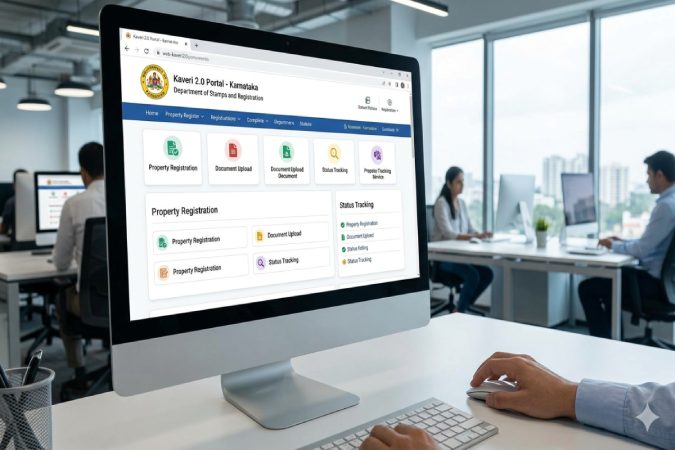
Development started in 2022-23 with features like e-Sign and DigiLocker. Version 2.0 rolled out major upgrades in 2025, including real-time sync.
It’s built by C-DAC and complies with WCAG 2.0 for accessibility. Screen readers like JAWS work seamlessly.
Purpose for Karnataka Property Owners
Homebuyers use it for EC before loans. Sellers check clear titles via e-Khata. It cuts visits to sub-registrar offices (SROs).
For example, Bangalore users link BBMP e-Aasthi data directly. Rural gram panchayat khata holders access legacy records.
Key Features of Kaveri 2.0
The portal offers appointment scheduling, online payments, and advanced tracking. Blockchain adds security for records.
Upgrades from Kaveri 1.0
Old Kaveri had basic EC but no full e-Khata sync. Here’s a comparison:
| Feature | Old Kaveri | Kaveri 2.0 |
| Real-time Sync | No | Yes |
| E-Khata Integration | Limited | Full (auto-fetch) |
| Payments | Partial | Seamless gateways |
| Tracking | Basic | Advanced dashboard |
| Digital Downloads | Limited | Instant PDFs |
This table shows why 2.0 processes EC in 7 days versus weeks before.
E-Khata and EC Integration
E-Khata verifies property tax compliance. Kaveri 2.0 pulls data statewide, including A khata, B khata.
Search by name, survey number, or deed. Legacy pre-Kaveri ECs are accessible to SROs and citizens.
How to Register and Login to Kaveri 2.0
First-time users need a mobile number and email. No app yet—use browser on mobile or desktop.
Step-by-Step Registration
- Go to https://kaveri.karnataka.gov.in.
- Click “Register” under Citizen Login.
- Enter mobile, email, name—mandatory fields.
- Get auto-password via SMS/email.
- Set new password.
Takes 2 minutes. Verify Aadhaar later for e-Sign.
Login Process and OTP Verification
- Click “Login”.
- Enter mobile/email and password.
- OTP to registered mobile.
- Dashboard opens.
Pro tip: Use Chrome for best mobile view.
Forgot Password Recovery
Click “Forgot Password”. Enter mobile, get OTP, set new one. Edit profile anytime for updates.
Downloading Encumbrance Certificate (EC) on Kaveri 2.0
EC proves no liens on property. Essential for loans, sales. Costs Rs 50-200 based on period.
Eligibility and Requirements
Need property details: district, taluk, survey/village number. Aadhaar for e-Sign.
Application Steps with Screenshots
- Login > Services > Encumbrance Certificate.
- Select search type (name/property).
- Enter details, period (e.g., 1990-2026).
- Pay online (UPI/Netbanking).
- Aadhaar verify, e-Sign.
- Download digitally signed EC in 7 days.
Track status via dashboard. Example: For a Bangalore plot, input BBMP khata number for instant prelim check.
Payment and Timeline (7 Days)
Fees auto-calculate. Refunds rare but possible via grievance. SRO signs digitally—no printing needed.
Property Registration and Appointment Booking
Book slots to avoid queues. Covers sale deeds, mortgages.
Booking Sub-Registrar Slot
- Login > Appointment.
- Pick district/SRO, date (7-30 days ahead).
- Confirm via OTP.
Peak times: Month-end. Book early.
Stamp Duty Calculation and Payment
Calculator on portal uses guidance value. Pay 5-7% online. Generate FRUITS e-Sala.
Upload docs: Aadhaar, PAN, deed draft. Track till certified copy.
Document Upload and Tracking
Advanced dashboard shows status: Pending, Approved, Rejected. Notifications via SMS.
E-Khata Services and Integration
E-Khata is digital property ID. Links with RTC/Bhoomi.
Search integrates BBMP, gram panchayats. Auto-fetch for registrations.
Example: BBMP users get e-Aasthi data pre-filled.
Common Issues and Troubleshooting
Portal downtime? Common during updates.
OTP/Login Errors
Clear cache, check signal. Alternate: Email login. Contact helpline 080-12345678 (generic).
Payment Failures
Retry after 10 mins. UPI issues? Use card. Screenshot for disputes.
Document Rejection Reasons
Invalid survey, mismatched names. Fix via edit, resubmit.
Recent Updates and News (2026)
In Feb 2026, audits revealed court-order bypasses for illegal deeds—1300+ cases. Officials suspended.
New: Enhanced cyber security, concurrent audits. Check official FAQ for patches.
Alternatives and Contacts
Downtime? Visit SRO offline. Bhoomi for RTC. Helpline: igr.karnataka.gov.in support.
Email grievances. User manual PDF downloadable from site.
This guide empowers you to handle property needs confidently. Always cross-verify with SRO for complex cases
How To Check Stamp Duty And Registration Fee On The Kaveri Portal Online
Checking stamp duty and registration fees on the Kaveri portal is straightforward using its built-in calculator, available to both guests and registered users. This tool bases calculations on the property’s guidance value and document type.
Quick Steps
- Visit the official Kaveri 2.0 portal at https://kaveri.karnataka.gov.in. No login required for calculator.
- Navigate to “Services” or “Stamp Duty and Registration Fee Calculator” on the homepage—often under Calculators or Property Valuation.
- Select document type (e.g., sale deed, lease, mortgage) from the dropdown.
- Enter property details: district, taluk/hobli, village/ward, survey/plot number, area (sq ft), and consideration value (sale price or market value).
- Click “Calculate” or “Check”. The portal displays stamp duty (typically 5-7% of higher of guidance/sale value), registration fee (1% + cess), and breakdown.
- Review results, print or save for records. Rates follow Karnataka Stamp Act 1957—check official fees schedule for updates.
Rates Overview (2026)
Stamp duty varies by gender/location (e.g., women buyers get 1% rebate on first Rs 5L). Registration is 1% flat. Use the tool for precise figures based on guidance value.
| Transaction Type | Stamp Duty (approx.) | Registration Fee |
| Sale Deed | 5-6% | 1% |
| Gift (Family) | Rs 500-1,000 | 1% |
| Lease | 0.5-5% of rent | 1% |
Tips and Troubleshooting
Guidance value is key—check it first via the valuation tool if unknown. Higher of guidance or sale price applies.
Common issues: Invalid details (retry with exact survey no.), server slowdown (try off-peak). For disputes, contact helpline via igr.karnataka.gov.in.
This process ensures transparency before registration or loans. Always verify with Sub-Registrar for complex cases.
Stamp duty rates for different property types in Karnataka
Stamp duty rates in Karnataka follow a slab-based structure tied to the property’s market or guidance value (whichever is higher), as per the Karnataka Stamp Act. These apply uniformly across residential, commercial, and other property types, with minor variations for specific transactions like gifts or leases. Rates remain consistent into 2026, though registration fees doubled to 2% from August 31, 2025.
Current Slab Rates (2026)
Rates are gender-neutral but include rebates for women buyers on the first Rs 5 lakh (1% concession). Here’s the breakdown:
| Property Value Slab | Stamp Duty Rate | Registration Fee | Typical Total Cost |
| Up to Rs 20 lakh | 2% | 2% | 4% + cess |
| Rs 21-45 lakh | 3% | 2% | 5% + cess |
| Above Rs 45 lakh | 5% | 2% | 7% + cess |
Cess adds 0.5-1% in some cases (e.g., metro cess in Bangalore). Use the Kaveri portal calculator for exact figures.
Rates by Property Type
- Sale Deed (Residential/Commercial): Uses slabs above; e.g., a Rs 50 lakh flat incurs 5% stamp duty (Rs 2.5 lakh) + 2% registration (Rs 1 lakh).
- Gift Deed (Family): Fixed Rs 500-1,000; non-family follows sale slabs.
- Lease: 0.5-5% of average annual rent over term (slab-adjusted).
- Mortgage: 0.5% of loan amount (max Rs 10 lakh cap).
- Partition: 1-2% of market value per share.
- Power of Attorney (Sale): 0.1% or Rs 100, whichever higher.
Industrial properties may see slight hikes (5.5-6%), but standard slabs dominate.
Calculation Example
For a Rs 35 lakh residential plot:
- Stamp duty: 3% = Rs 1.05 lakh
- Registration: 2% = Rs 70,000
- Total: ~Rs 1.75 lakh (+ cess).
Guidance values reset periodically—check via Kaveri or igr.karnataka.gov.in. Rebates apply for first-time women buyers or govt schemes.
Conclusion
Karnataka’s stamp duty rates follow a progressive slab system—2% up to Rs 20 lakh, 3% for Rs 21-45 lakh, and 5% above Rs 45 lakh—applied to the higher of market or guidance value, with registration fees at 2% as of late 2025. These costs vary slightly by transaction type like sales, gifts, or leases, but the Kaveri 2.0 portal calculator provides precise, real-time breakdowns for any property. Always verify current rates on igr.karnataka.gov.in to account for rebates or cess, ensuring smooth property dealings.
FAQ SECTION
What is Kaveri 2.0 portal used for?
Kaveri 2.0 is Karnataka’s online platform for property registration, EC downloads, e-Khata checks, and stamp duty payments.
How do I login to Kaveri 2.0?
Visit kaveri.karnataka.gov.in, enter mobile/email and password, verify OTP. New users register first.
How long does EC take on Kaveri 2.0?
Typically 7 days after payment and e-Sign; track via dashboard.
What is the difference between Kaveri 1.0 and 2.0?
2.0 adds e-Khata sync, better payments, real-time tracking—see comparison table above.
How to book appointment on Kaveri 2.0?
Login > Appointments > Select SRO/date > Confirm OTP.
Is there a Kaveri 2.0 mobile app?
No official app; use mobile browser for responsive access.
How to recover forgot password in Kaveri 2.0?
Click Forgot Password, enter mobile, OTP, set new one.
What if EC application is rejected on Kaveri 2.0?
Check reasons (e.g., wrong details), edit, resubmit. Contact support if needed.